


- Новости
- ИССЛЕДОВАТЬ
- Страницы
- Группы
- Мероприятия
- Reels
- Статьи пользователей
- Маркет
- Funding
- Offers
- Jobs
- Courses
- Форумы
- Кинозал
- Игры
- Разработчики
- Merits
-
 The Holy Bible: Read, Listen, Watch — All Versions, Concordance & Study Tools
-
 A.D. The Bible Continues - 01 - The Tomb Is Open
-
 New! Daily Confessions ~ Christian Audio Bible Study MP3 Series
-
 CHRISTIAN LIBRARY
-
 Donate | $
-
 Donate | Crypto
-
 О нас
О нас
-
 Terms & Conditions
-
 Конфиденциальность
-
 Earn Online
What Is an EMB File for Embroidery? Complete Guide
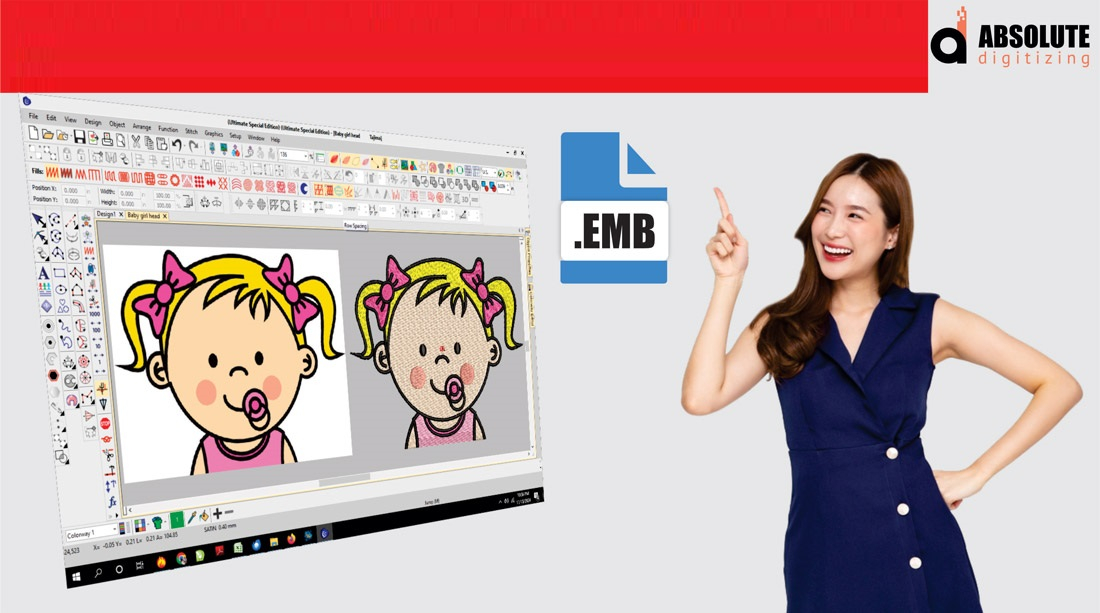
A lot of people entering the embroidery world quickly come across terms like DST, PES, EXP, and EMB. While some of these files are used directly by embroidery machines, the EMB file stands out for a different reason—it’s often considered the “master file” of embroidery digitizing.
If you've ever wondered what is an EMB file for embroidery, you're not alone. Understanding this file format can help you save time, improve design quality, and make future edits much easier.
In this guide, we'll break down everything you need to know about EMB files, how they work, and why professional digitizers at Absolute Digitizing rely on them to create high-quality embroidery designs.
What Is an EMB File for Embroidery?
An EMB file is a native embroidery design file that stores all the editable information of a digitized embroidery design. Unlike machine-ready files, an EMB file contains the complete project data used during the digitizing process.
Think of it like the source file of a graphic design project. Just as designers keep editable artwork files, embroidery digitizers use EMB files to preserve every detail of a design.
An EMB file may contain:
- Stitch types
- Stitch directions
- Stitch density settings
- Underlay information
- Thread colors
- Object properties
- Design layers
- Editing history
Because all this information remains editable, the EMB file is one of the most valuable assets in embroidery digitizing.
Why EMB Files Are Important
Many embroidery machine formats only contain stitch instructions. Once a design is saved into those formats, making changes can be difficult.
An EMB file allows digitizers to:
- Edit designs easily
- Resize artwork more accurately
- Adjust stitch density
- Change thread colors
- Modify lettering
- Optimize designs for different fabrics
This flexibility makes EMB files essential for professional embroidery production.
How an EMB File Differs from Machine Files
A common misconception is that EMB files can be loaded directly into embroidery machines. In most cases, they cannot.
Here's a simple comparison:
| EMB File | Machine File |
|---|---|
| Fully editable | Limited editing |
| Stores design objects | Stores stitch commands |
| Used by digitizers | Used by embroidery machines |
| Ideal for revisions | Ready for production |
| Contains complete project data | Contains stitch data only |
The EMB file acts as the master project, while machine files are exported versions ready for stitching.
Benefits of Using EMB Files
Easy Design Modifications
Need to change a logo size? Update text? Adjust stitch density?
With an EMB file, these edits can be made quickly without recreating the entire design.
Better Long-Term Design Management
Businesses often update logos, slogans, or branding elements over time.
Keeping an EMB file ensures future changes can be completed efficiently.
Improved Design Quality
Since all embroidery objects remain editable, digitizers can make precise adjustments to improve stitch quality and fabric performance.
Faster Revisions
When customers request changes, the EMB file allows modifications without starting from scratch.
What Information Is Stored in an EMB File?
Stitch Data
The file stores every stitch object and sewing path used in the design.
Thread Colors
Color information is preserved for accurate production.
Underlay Settings
Underlay stitches help stabilize embroidery and improve stitch quality.
Object Properties
Each design element remains editable, including:
- Fill stitches
- Satin stitches
- Running stitches
- Borders
- Lettering
Design Layout
The placement and sequencing of design components are saved within the file.
How EMB Files Fit Into the Digitizing Process
The embroidery digitizing workflow typically follows these steps:
Step 1: Artwork Preparation
A logo or image is prepared for digitizing.
Step 2: Design Digitizing
The digitizer creates embroidery objects and stitch paths.
Step 3: Save as EMB
The project is saved as an EMB file to preserve all editing capabilities.
Step 4: Export Machine Format
The design is converted into machine-readable formats such as:
- DST
- PES
- EXP
- JEF
- VP3
Step 5: Embroidery Production
The machine-ready file is used for stitching.
This process helps maintain flexibility while ensuring production compatibility.
Common Uses for EMB Files
Corporate Logo Embroidery
Businesses often need logo updates or size adjustments over time.
Uniform Programs
Organizations managing multiple garment types benefit from keeping editable EMB files.
Custom Apparel Shops
Embroidery businesses frequently modify customer designs for different products.
Promotional Products
EMB files simplify adapting designs for hats, bags, jackets, and other items.
Why Professional Digitizers Keep EMB Files
Imagine building a house without saving the blueprint. Any future renovation would become much harder.
The EMB file works the same way. It serves as the embroidery blueprint.
Professional digitizers save EMB files because they:
- Protect the original design
- Simplify revisions
- Improve scalability
- Reduce production time
- Maintain design consistency
This practice helps deliver better embroidery results for clients.
How Absolute Digitizing Uses EMB Files
At Absolute Digitizing, every design is created with long-term usability in mind.
By maintaining EMB files throughout the digitizing process, the team can:
- Make future revisions efficiently
- Optimize designs for multiple garment types
- Improve stitch quality
- Support customer updates
- Deliver consistent embroidery results
This approach ensures customers receive designs that are both production-ready and adaptable for future needs.
Tips for Managing EMB Files
To get the most value from your embroidery designs:
Keep Backup Copies
Store EMB files securely so future edits remain possible.
Organize Your Design Library
Use clear file names and folders for easy access.
Save Original Artwork
Keeping source artwork alongside EMB files speeds up future revisions.
Work With Experienced Digitizers
Professional digitizers create cleaner EMB files that are easier to modify and maintain.
Conclusion
Understanding what is an EMB file for embroidery is essential for anyone involved in embroidery production. Unlike machine-ready files, an EMB file contains all the editable design information needed for future modifications, resizing, optimization, and quality improvements.
Think of it as the master blueprint behind every professional embroidery design. By preserving stitch settings, object properties, thread colors, and layout information, EMB files help ensure flexibility and consistency throughout the embroidery process.
Whether you're a business owner, apparel decorator, or embroidery enthusiast, working with professionals like Absolute Digitizing can help you maximize the value of your embroidery designs by maintaining properly structured EMB files for future use.
FAQs
What is an EMB file used for in embroidery?
An EMB file is used as an editable master file that stores all design elements, stitch settings, and embroidery object information.
Can embroidery machines read EMB files directly?
Most embroidery machines cannot read EMB files directly. The design usually needs to be exported into a machine-compatible format such as DST or PES.
Why should I keep my EMB file?
Keeping the EMB file allows future edits, resizing, color changes, and design updates without recreating the design from scratch.
Is an EMB file better than a DST file?
They serve different purposes. EMB files are editable project files, while DST files are production-ready machine files.
Can an EMB file be converted into other embroidery formats?
Yes. Professional digitizers can export EMB files into various embroidery machine formats, including DST, PES, EXP, JEF, and VP3.
 Russian
 English
 Arabic
 French
 Spanish
 Portuguese
 Deutsch
 Turkish
 Dutch
Dutch
 Italiano
 Romaian
 Portuguese (Brazil)
 Greek
Greek